

For Employers
How to verify an Australian Standard Typing Certificate
Every certificate has its own verification link and QR code, so you can check a candidate's result against our records online, with no account needed.

Ask for the certificate
The candidate can send you their certificate PDF or share their verification link.

Scan or open the link
Scan the QR code on page 1 of the certificate or open the verification link printed just under it.

Check the details match
The candidate's name, scores, date and certificate ID should match the certificate you were given.
What the verification page shows
The verification page shows the result as it's held in our records, so you can check it against the certificate you were given. If anything doesn't match, please let us know.
✓ Candidate's full name
✓ Issuing agency
✓ Date of assessment
✓ Test type
✓ Net WPM
✓ Typing accuracy, to one decimal place
✓ Certificate ID
✓ ACP snapshot status
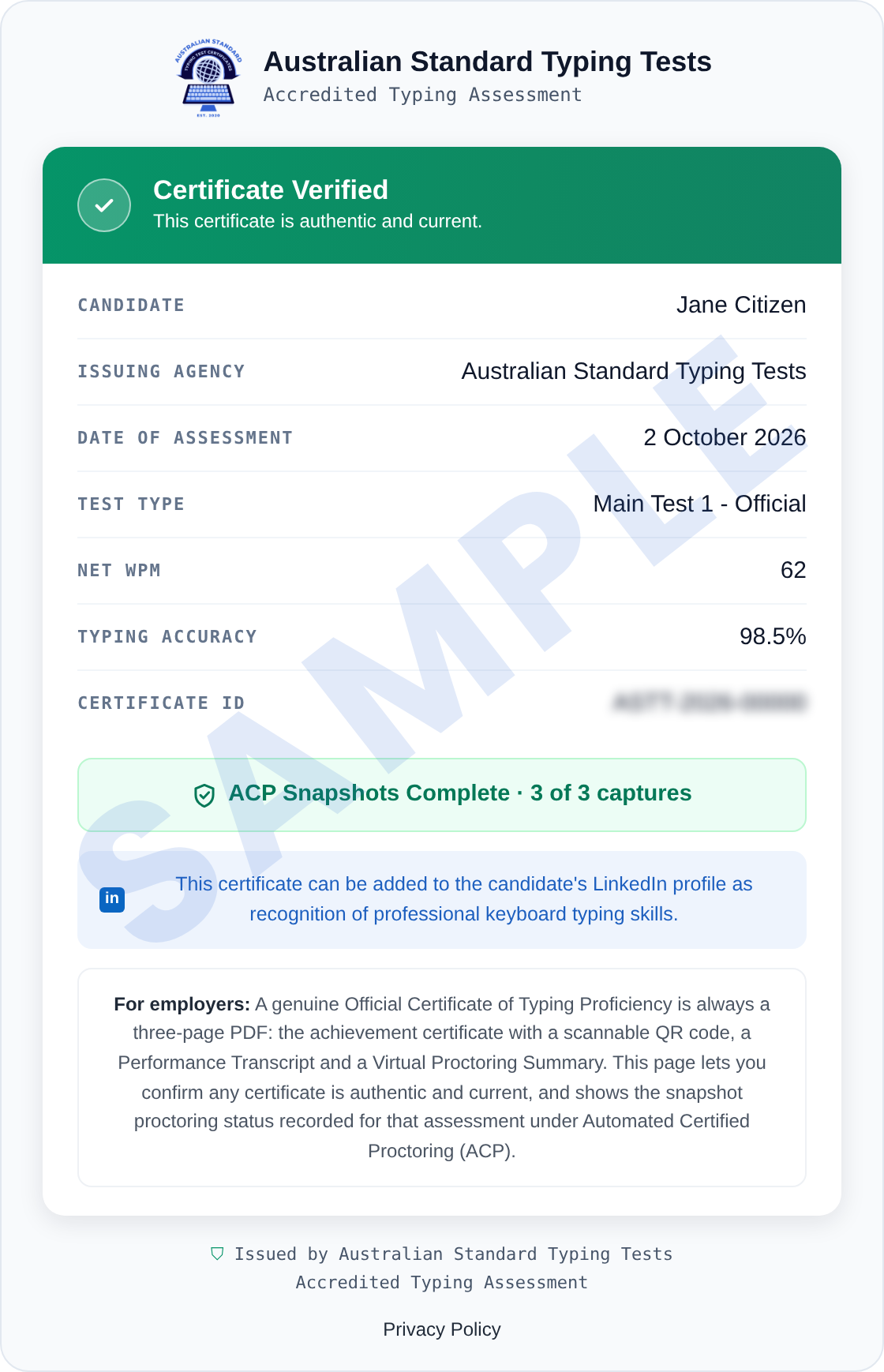
Webcam snapshot images are never shown on the verification page.
Seeing "Certificate Not Found"?
This means the link is incomplete or the record is no longer current. Check the link was copied in full or ask the candidate for a current verification link. A certificate can no longer be verified once the candidate deletes their account, since deletion permanently removes the record.
How Automated Certified Proctoring works

Under Automated Certified Proctoring (ACP), optional webcam snapshots are taken at the start, midpoint and end of each 5‑minute Main Test. We recommend using a webcam, but candidates can decline and their typing result is unaffected. Any missed capture is shown openly on the certificate and the verification page.
✓ Still images only, no video or audio
✓ A missed capture never stops the test
✓ No facial recognition or face matching
✓ Images never shown on the verification page
ACP Snapshots Not Completed
0 of 3 captures
The Main Test was completed without webcam proctoring. The typing result is unaffected.
ACP Snapshots Partial
1 or 2 of 3 captures
A snapshot was missed at one or more capture points, for example if the webcam was interrupted.
ACP Snapshots Complete
3 of 3 captures
A snapshot was captured at all three capture points.
Every certificate's verification page shows one of these three statuses.
What makes Australian Standard Typing Tests special?
✓ Main Tests follow the method set out in AS2708‑2001 Keyboarding speed tests
✓ Pasting and similar shortcuts are disabled
✓ Professionally written passages, scored automatically
✓ Typing test access within minutes of purchase, with secure sign-in links sent to the candidate’s email address
✓ 5‑minute Main Tests, timed by our servers
✓ Main Tests completed on a desktop or laptop computer
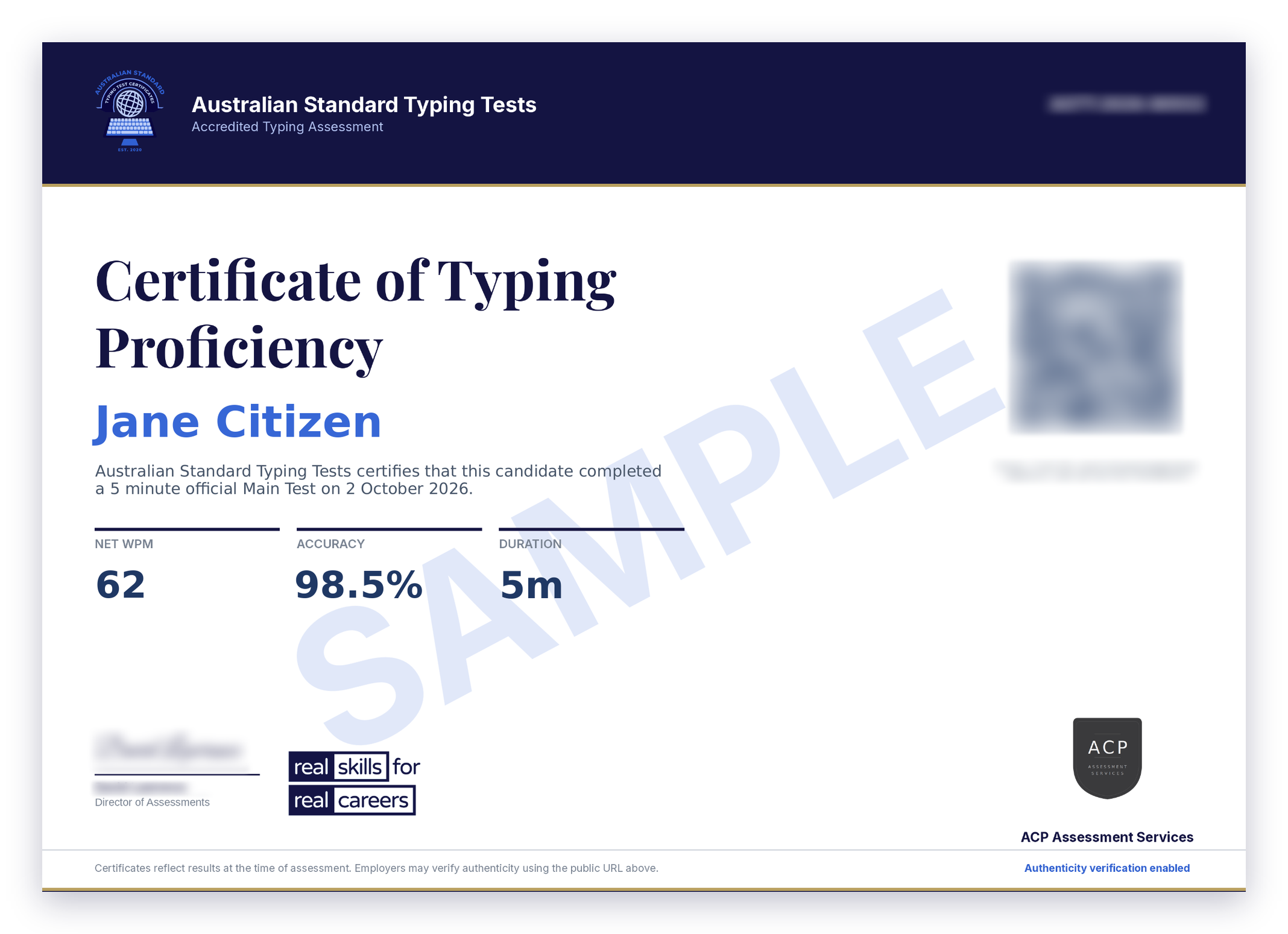
Sample Australian Standard Typing Tests Certificate, page 1
A genuine certificate always has three pages
Every Main Test produces a three-page PDF certificate:
1) Certificate, with its QR code and verification link
2) Performance Transcript, showing the text the candidate typed
3) Virtual Proctoring Summary, showing the webcam snapshots or a placeholder for any missed capture
Certificate validity
Certificates reflect results at the time of assessment. Most employers consider typing certificates valid for 12 months.
Custom typing tests for organisations
Hiring for roles that need fast, accurate typing, or assessing keyboarding skills in a course? We create custom typing tests on request for businesses, recruiters, universities, TAFEs and training providers. Tell us what you need and we'll let you know what we can offer.
Email us at info@AustralianStandardTypingTests.com.au
or send us a message through our contact form.
Need a typing certificate?
Choose your pack and sit your 5‑minute AS2708‑2001 Main Test online, with unlimited Practice Tests to warm up first. Your accredited certificate is generated straight away, with its own verification link and QR code.